

Color palette overview
The Color palette (Window > Color) displays the color values for the current foreground and background colors. Using the sliders in the Color palette, you can edit the foreground and background colors using different color models. You can also choose a foreground or background color from the spectrum of colors displayed in the color ramp at the bottom of the palette.
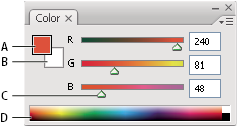
Color palette
- A.
- Foreground color
- B.
- Background color
- C.
- Slider
- D.
- Color ramp
The Color palette may display the following alerts when you select a color:
-
An exclamation point inside a triangle
 appears
above the left side of the color ramp when you choose a color that
cannot be printed using CMYK inks.
appears
above the left side of the color ramp when you choose a color that
cannot be printed using CMYK inks. -
A cube
 appears
above the left side of the color ramp when you choose a color that
is not web‑safe.
appears
above the left side of the color ramp when you choose a color that
is not web‑safe.
 Change the color model of the Color palette sliders
 Choose a Sliders option from the
Color palette menu.
Choose a Sliders option from the
Color palette menu. To change the spectrum of the color ramp
quickly, Shift-click in the color ramp until you see the spectrum
you want.
To change the spectrum of the color ramp
quickly, Shift-click in the color ramp until you see the spectrum
you want.