

Channels palette overview
The Channels palette lists all channels in the image—composite channel first (for RGB, CMYK, and Lab images). A thumbnail of the channel’s contents appears to the left of the channel name; the thumbnail is automatically updated as you edit the channel.
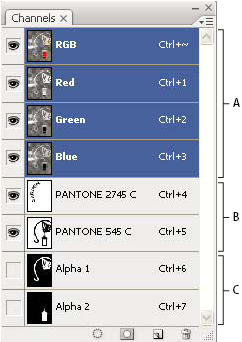
Channel types
- A.
- Color channels
- B.
- Spot channels
- C.
- Alpha channels
 Display the Channels palette
 Choose
Windows > Channels.
Choose
Windows > Channels.