

Slice a web page
You can use the slice tool to draw slice lines directly on an image, or design your graphic using layers, and then create slices based on the layers.
 Create a slice with the Slice tool
 . Any
existing slices automatically appear in the document window.
. Any
existing slices automatically appear in the document window. Create slices from guides
Create a slice from a layer
A layer based slice encompasses all the pixel data in the layer. If you move the layer or edit the layer’s content, the slice area automatically adjusts to include the new pixels.
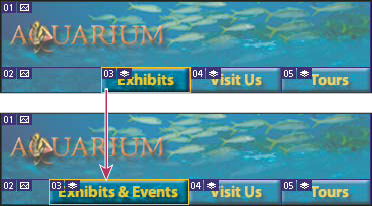
A layer-based slice is updated when the source layer is modified.
Layer-based slices are less flexible than user slices; however, you can convert (“promote”) a layer-based slice to a user slice. See Convert auto and layer-based slices to user slices.
- Select a layer in the Layers palette.
- Choose Layer > New Layer Based Slice.
 Don’t use a layer-based slice when you
plan to move the layer over a large area of the image during an
animation, because the slice dimension may exceed a useful size.
Don’t use a layer-based slice when you
plan to move the layer over a large area of the image during an
animation, because the slice dimension may exceed a useful size.