

Working with pop‑up palettes
Pop‑up palettes provide easy access to available options for brushes, swatches, gradients, styles, patterns, contours, and shapes. You can customize pop‑up palettes by renaming and deleting items and by loading, saving, and replacing libraries. You can also change the display of a pop‑up palette to view items by their names, as thumbnail icons, or with both names and icons.
Click a tool thumbnail in the options bar to show its pop‑up palette. Click an item in the pop‑up palette to select it.
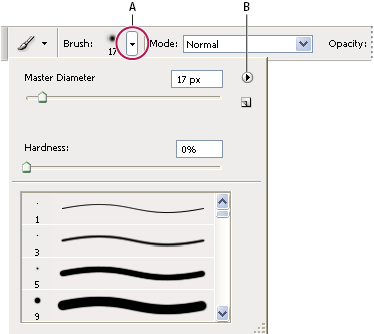
Viewing the Brush pop‑up palette in the options bar
- A.
- Click to show the pop‑up palette.
- B.
- Click to view the pop‑up palette menu.
 Rename or delete an item in a pop‑up palette
 Select an item, click the triangle
in the upper right corner of the pop‑up palette, and choose one
of the following:
Select an item, click the triangle
in the upper right corner of the pop‑up palette, and choose one
of the following: - Rename
- Lets you enter a new name for the item.
- Delete
-
Deletes an item in the pop‑up palette.
Note: You can also delete an item in a pop‑up palette by holding down Alt (Windows) or Option (Mac OS) and clicking the item.
Customize the list of items in a pop‑up palette
- To save the current list as a library for later use,
choose the Save command. Then enter a name for the library file,
and click Save.
 (Mac OS) Include the extension
of the library file name so that you can easily share the libraries
across operating systems. Select Append File Extension Always in the
File Handling Preferences to append extensions to file names.
(Mac OS) Include the extension
of the library file name so that you can easily share the libraries
across operating systems. Select Append File Extension Always in the
File Handling Preferences to append extensions to file names.