

Choose a font family and style
- Choose a font family from the Font Family
menu in the Character palette or options bar. If more than one copy
of a font is installed on your computer, an abbreviation follows
the font name: (T1) for Type 1 fonts, (TT) for TrueType fonts, or
(OT) for OpenType fonts.
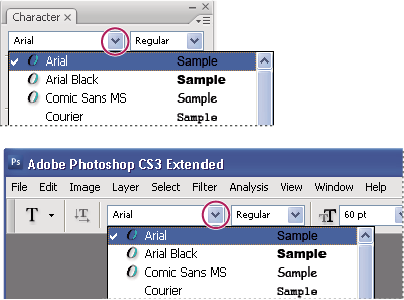 The Font Family menu in both the Character palette and the options bar shows a preview of available fonts.
 You can choose a font family and style by typing
its name in the text box. As you type, the name of the first font
or style beginning with that letter appears. Continue typing until
the correct font or style name appears.
You can choose a font family and style by typing
its name in the text box. As you type, the name of the first font
or style beginning with that letter appears. Continue typing until
the correct font or style name appears. - To choose a font style, do one of the following:
-
Choose a font style from the Font Style menu in the Character palette or options bar.
-
If the font family you chose does not include a bold or italic style, click the Faux Bold button
 or
the Faux Italic button
or
the Faux Italic button  in
the Character palette to apply a simulated style. Alternatively,
choose Faux Bold or Faux Italic from the Character palette menu.
in
the Character palette to apply a simulated style. Alternatively,
choose Faux Bold or Faux Italic from the Character palette menu. -
Use a dynamic shortcut. Dynamic shortcuts are keyboard shortcuts that are available (in edit mode only) for Faux Bold, Faux Italic, All Caps, Small Caps, Superscript, Subscript, Underline, and Strikethrough.
Note: You cannot apply Faux Bold formatting to warped type. -