

Create a Photomerge composition
When you set up a Photomerge composition, you identify your source files, and the panorama is automatically assembled. After the panorama is assembled, you can fine‑tune the placement of the individual photos, if necessary.
- Click the Browse button to navigate to the source files
or folder you want to use to create the Photomerge composition.
 You can add more files by clicking the
Browse button again and navigating to the source files. You can
always remove a file from the Source Files list by selecting the file
and clicking the Remove button.
You can add more files by clicking the
Browse button again and navigating to the source files. You can
always remove a file from the Source Files list by selecting the file
and clicking the Remove button. - Choose a Layout option.
- Auto
- Photoshop analyzes the source images and applies either a Perspective or Cylindrical layout, depending on which produces a better photomerge.
- Perspective
- Creates a consistent composition by designating one of the source images (by default, the middle image) as the reference image. The other images are then transformed (repositioned, stretched or skewed as necessary) so that overlapping content across layers is matched.
- Cylindrical
-
Reduces the “bow‑tie” distortion that can occur with
the Perspective layout by displaying individual images as on an
unfolded cylinder. Overlapping content across layers is still matched.
The reference image is placed at the center. Best suited for creating
wide panoramas.
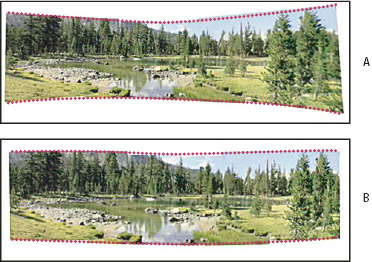 Adding Cylindrical Mapping
- A.
- Original
- B.
- Cylindrical Mapping applied
- Reposition Only
- Aligns the layers and matches overlapping content, but does not transform (stretch or skew) any of the source layers.
- Interactive Layout
- Choose this option to open the source images in a dialog and position them manually for the best result. See Create a photomerge interactively.
- When you’ve added all the source files, click OK
to create the Photomerge composition.
If the composition can’t be automatically
assembled, a message appears on‑screen. You can assemble the composition
manually in the Photomerge dialog box using the lightbox.
Photoshop creates one multi‑layer image from the source images, adding layer masks as needed to create optimal blending where the images overlap. You can edit the layer masks or add adjustment layers to further fine tune the different areas of the panorama.