

Histogram palette overview
 Choose
Window > Histogram or click the Histogram tab to open
the Histogram palette. By default, the Histogram palette opens in
Compact View with no controls or statistics, but you can adjust
the view.
Choose
Window > Histogram or click the Histogram tab to open
the Histogram palette. By default, the Histogram palette opens in
Compact View with no controls or statistics, but you can adjust
the view.
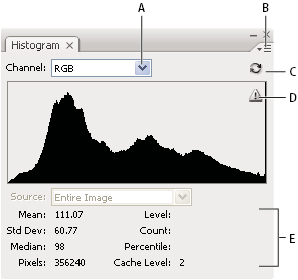
- A.
- Channel menu
- B.
- Palette menu
- C.
- Uncached Refresh button
- D.
- Cached Data Warning icon
- E.
- Statistics
 Adjust the view of the Histogram palette
Choose a view from
the Histogram palette menu. - Expanded View
- Displays the histogram with statistics and with controls for choosing the channel represented by the histogram, viewing options in the Histogram palette, refreshing the histogram to display uncached data, and choosing a specific layer in a multilayered document.
- Compact View
- Displays a histogram with no controls or statistics. The histogram represents the entire image.
- All Channels View
-
Displays individual histograms of the channels in addition
to all the options of the Expanded View. The individual histograms
do not include alpha channels, spot channels, or masks.
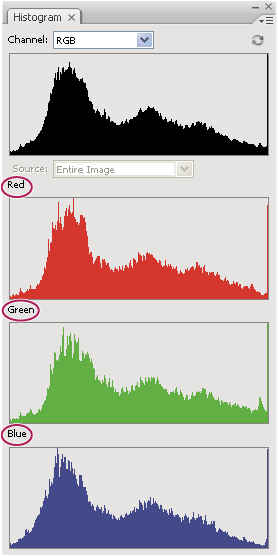 Histogram palette with all channels displayed and statistics hidden
View a specific channel in the histogram
If you chose the Expanded View or All Channels View of the Histogram palette, you can choose a setting from the Channel menu. Photoshop remembers the channel setting if you switch from either Expanded View or All Channels View back to Compact View.
View channel histograms in color
From the Histogram palette, do
one of the following:-
In the All Channels View, choose Show Channels In Color from the Palette menu.
-
In Expanded View or All Channels View, choose an individual channel from the Channel menu and choose Show Channels In Color from the Palette menu. If you switch to Compact View, the channel continues to be shown in color.
-
In Expanded View or All Channels View, choose Colors from the Channel menu to show a composite histogram of the channels in color. If you switch to Compact View, the composite histogram continues to be shown in color.