


Actions palette overview
You use the Actions palette (Window > Actions) to record, play, edit, and delete individual actions. This palette (called the Actions panel in Illustrator) also lets you save and load action files.
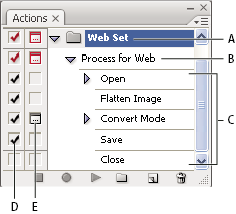
Photoshop Actions palette
- A.
- Action set
- B.
- Action
- C.
- Recorded commands
- D.
- Included command
- E.
- Modal control (toggles on or off)
 Expand and collapse sets, actions, and commands
 Click the triangle to the left
of the set, action, or command in the Actions palette. Alt-click
(Windows) or Option-click (Mac OS) the triangle to expand
or collapse all actions in a set or all commands in an action.
Click the triangle to the left
of the set, action, or command in the Actions palette. Alt-click
(Windows) or Option-click (Mac OS) the triangle to expand
or collapse all actions in a set or all commands in an action.View actions by name only
Choose
Button Mode from the Actions palette menu. Choose Button Mode again
to return to list mode.
Note: You can’t view individual commands or sets in Button
mode.