

Layers palette overview
The Layers palette lists all layers, layer groups, and layer effects in an image. You can use the Layers palette to show and hide layers, create new layers, and work with groups of layers. You can access additional commands and options in the Layers palette menu.
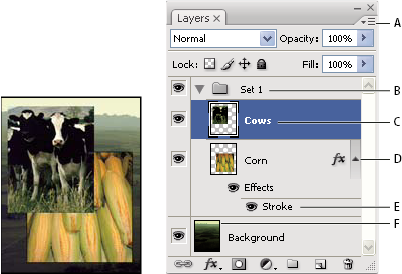
Photoshop Layers palette
- A.
- Layers palette menu
- B.
- Layer Group
- C.
- Layer
- D.
- Expand/Collapse Layer effects
- E.
- Layer effect
- F.
- Layer thumbnail
 Display the Layers palette
Choose a command from the Layers palette menu
Change the size of layer thumbnails
Change thumbnail contents
 Choose Palette Options from the
Layers palette menu, and select Entire Document to display the contents
of the entire document. Select Layer Bounds to restrict the thumbnail
to the object’s pixels on the layer.
Choose Palette Options from the
Layers palette menu, and select Entire Document to display the contents
of the entire document. Select Layer Bounds to restrict the thumbnail
to the object’s pixels on the layer.
 Turn
off thumbnails to improve performance and save monitor space.
Turn
off thumbnails to improve performance and save monitor space.Expand and collapse groups
Click the triangle to the left
of a group folder. See View layers and groups within a group.