

Filter Gallery overview
The Filter Gallery provides a preview of many of the special effects filters. You can apply multiple filters, turn on or off the effect of a filter, reset options for a filter, and change the order in which filters are applied. When you are satisfied with the preview, you can then apply it to your image. Not all filters in the Filter menu are available in the Filter Gallery.
View full size graphic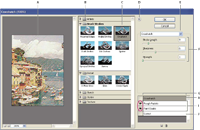
Filter Gallery dialog box
- A.
- Preview
- B.
- Filter category
- C.
- Thumbnail of selected filter
- D.
- Show/Hide filter thumbnails
- E.
- Filters pop‑up menu
- F.
- Options for selected filter
- G.
- List of filter effects to apply or arrange
- H.
- Filter effect selected but not applied
- I.
- Filter effects applied cumulatively but not selected
- J.
- Hidden filter effect
 Display the Filter Gallery
 Choose Filter > Filter
Gallery. Clicking a filter category name displays thumbnails of
available filter effects.
Choose Filter > Filter
Gallery. Clicking a filter category name displays thumbnails of
available filter effects. at
the top of the gallery
at
the top of the gallery